
141 lines
4.4 KiB
Markdown
141 lines
4.4 KiB
Markdown
# Meshtastic Web
|
|
|
|
<!--Project specific badges here-->
|
|
|
|
[](https://github.com/meshtastic/web/actions/workflows/ci.yml)
|
|
[](https://cla-assistant.io/meshtastic/web)
|
|
[](https://opencollective.com/meshtastic/)
|
|
[](https://vercel.com?utm_source=meshtastic&utm_campaign=oss)
|
|
|
|
## Overview
|
|
|
|
Official [Meshtastic](https://meshtastic.org) web interface, that can be hosted
|
|
or served from a node
|
|
|
|
**[Hosted version](https://client.meshtastic.org)**
|
|
|
|
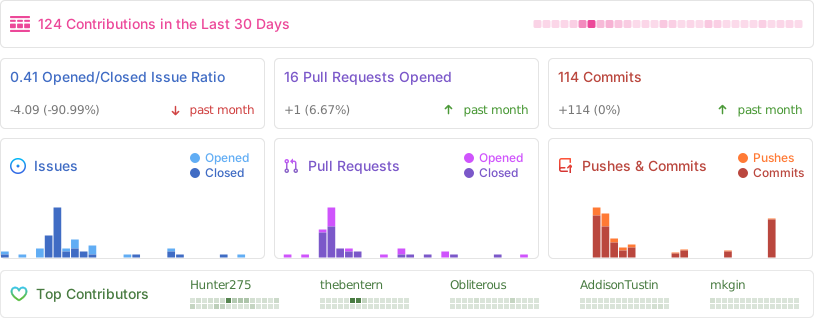
## Stats
|
|
|
|
|
|
|
|
## Progress Web App Support (PWA)
|
|
|
|
Meshtastic Web Client now includes Progressive Web App (PWA) functionality,
|
|
allowing users to:
|
|
|
|
- Install the app on desktop and mobile devices
|
|
- Access the interface offline
|
|
- Receive updates automatically
|
|
- Experience faster load times with caching
|
|
|
|
To install as a PWA:
|
|
|
|
- On desktop: Look for the install icon in your browser's address bar
|
|
- On mobile: Use "Add to Home Screen" option in your browser menu
|
|
|
|
PWA functionality works with both the hosted version and self-hosted instances.
|
|
|
|
## Self-host
|
|
|
|
The client can be self hosted using the precompiled container images with an OCI
|
|
compatible runtime such as [Docker](https://www.docker.com/) or
|
|
[Podman](https://podman.io/). The base image used is
|
|
[Nginx 1.27](https://hub.docker.com/_/nginx)
|
|
|
|
```bash
|
|
# With Docker
|
|
docker run -d -p 8080:8080 --restart always --name Meshtastic-Web ghcr.io/meshtastic/web
|
|
|
|
#With Podman
|
|
podman run -d -p 8080:8080 --restart always --name Meshtastic-Web ghcr.io/meshtastic/web
|
|
```
|
|
|
|
## Nightly releases
|
|
|
|
Our nightly releases provide the latest development builds with cutting-edge
|
|
features and fixes. These builds are automatically generated from the latest
|
|
main branch every night and are available for testing and early adoption.
|
|
|
|
```bash
|
|
# With Docker
|
|
docker run -d -p 8080:8080 --restart always --name Meshtastic-Web ghcr.io/meshtastic/web:nightly
|
|
#With Podman
|
|
podman run -d -p 8080:8080 --restart always --name Meshtastic-Web ghcr.io/meshtastic/web:nightly
|
|
```
|
|
|
|
> [!WARNING]
|
|
>
|
|
> - Nightly builds represent the latest development state and may contain
|
|
> breaking changes
|
|
> - These builds undergo automated testing but may be less stable than tagged
|
|
> release versions
|
|
> - Not recommended for production environments unless you are actively testing
|
|
> new features
|
|
> - No guarantee of backward compatibility between nightly builds
|
|
|
|
### Version Information
|
|
|
|
Each nightly build is tagged with:
|
|
|
|
- The nightly tag for the latest build
|
|
- A specific SHA for build reproducibility
|
|
|
|
### Feedback
|
|
|
|
If you encounter any issues with nightly builds, please report them in our
|
|
[issues tracker](https://github.com/meshtastic/web/issues). Your feedback helps
|
|
improve the stability of future releases
|
|
|
|
## Development & Building
|
|
|
|
You'll need to download the package manager used with this repo. You can install
|
|
it by visiting [deno.com](https://deno.com/) and following the installation
|
|
instructions listed on the home page.
|
|
|
|
### Development
|
|
|
|
Install the dependencies.
|
|
|
|
```bash
|
|
deno i
|
|
```
|
|
|
|
Start the development server:
|
|
|
|
```bash
|
|
deno task dev
|
|
```
|
|
|
|
### Building and Packaging
|
|
|
|
Build the project:
|
|
|
|
```bash
|
|
deno task build
|
|
```
|
|
|
|
GZip the output:
|
|
|
|
```bash
|
|
deno task package
|
|
```
|
|
|
|
### Why Deno?
|
|
|
|
Meshtastic Web uses Deno as its development platform for several compelling
|
|
reasons:
|
|
|
|
- **Built-in Security**: Deno's security-first approach requires explicit
|
|
permissions for file, network, and environment access, reducing vulnerability
|
|
risks.
|
|
- **TypeScript Support**: Native TypeScript support without additional
|
|
configuration, enhancing code quality and developer experience.
|
|
- **Modern JavaScript**: First-class support for ESM imports, top-level await,
|
|
and other modern JavaScript features.
|
|
- **Simplified Tooling**: Built-in formatter, linter, test runner, and bundler
|
|
eliminate the need for multiple third-party tools.
|
|
- **Reproducible Builds**: Lockfile ensures consistent builds across all
|
|
environments.
|
|
- **Web Standard APIs**: Uses browser-compatible APIs, making code more portable
|
|
between server and client environments.
|